



You can search for teaching jobs in ChatGPT by adding the EduJobs app and asking in plain language, such as "special education teacher jobs near Dallas on EduJobs." ChatGPT answers with current postings from school districts, charter schools, private schools and colleges, shown as cards you can open.
This post is for teachers and school staff who already use ChatGPT and want to search without leaving the conversation. It covers how to add the app, eight prompts to copy and what the app will not do.
How to add the EduJobs app
- Open the EduJobs app in ChatGPT while signed in to ChatGPT.
- Select Install Plugin. EduJobs does not ask you to sign in or create an account.
- Start a new conversation and ask for a job, ending with "on EduJobs."
You can also find it later under Settings > Plugins in ChatGPT, which is where you manage or disconnect it. OpenAI says app availability depends on your ChatGPT plan, region and the ChatGPT interface you use, and the EduJobs app is offered in the United States.
Add "on EduJobs" to every request
The most useful habit is also the simplest: end each request with "on EduJobs." Without it, ChatGPT may answer from its own built-in job search instead of the app, and you will not get the cards, the pay field or links to each posting on EduJobs.
You can also pick the app before you type. In a conversation, type @ and choose EduJobs, or select + and pick it from the menu, as OpenAI's help article on connected apps (opens in a new tab) describes.
What a search returns
Each search returns up to eight postings as cards, with the total number of matches in the reply. A card shows the employer, the job title, the location, pay when the posting lists it and the date posted. "View on EduJobs" opens the full posting.
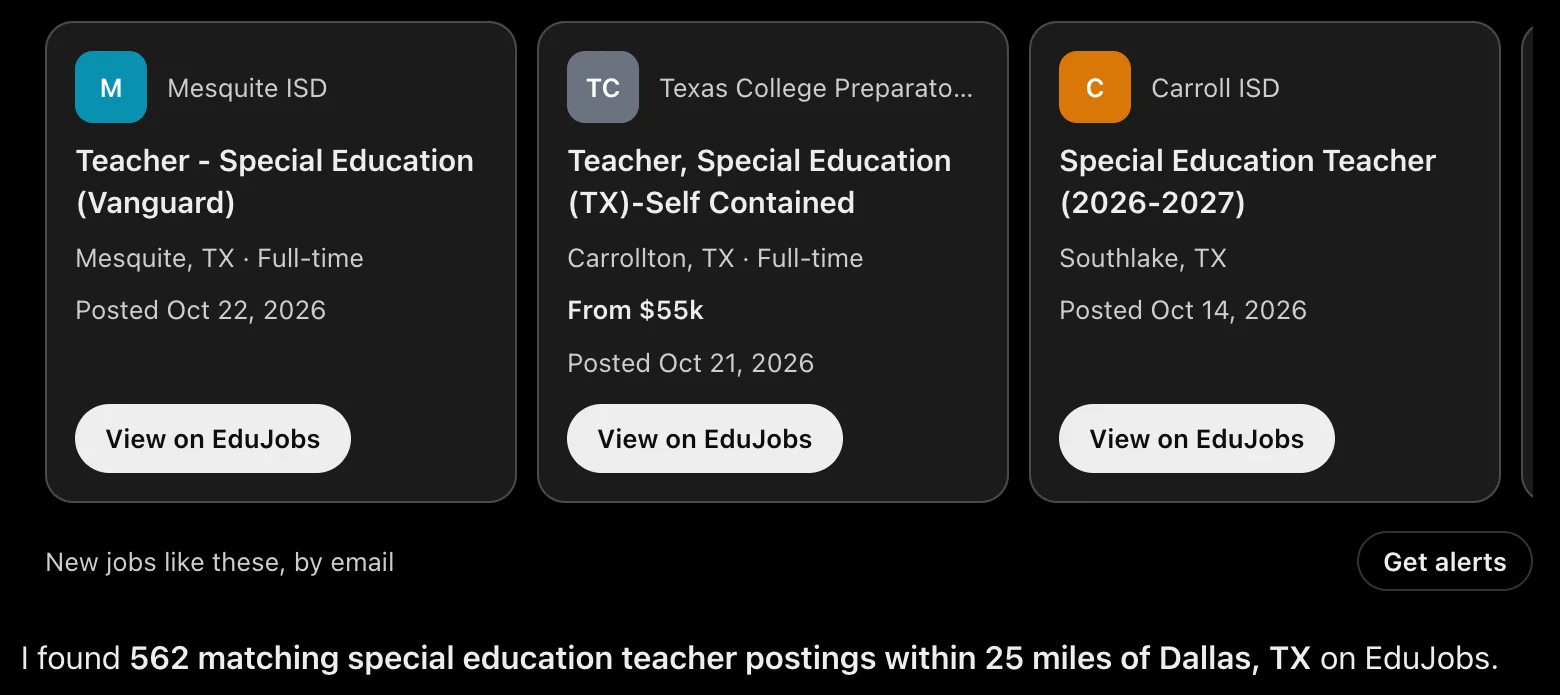
On that search, one card shows "From $55k" and the other two show no pay, because those postings did not list it. ChatGPT's written answer says "Pay not listed" for jobs like that rather than guessing.
Below the cards, Get alerts opens the EduJobs alert page, already filled in with a role and place from these results. Adjust it if you like and add your email to get new matches.
Eight prompts to copy
Prompts that name a role and a city work well. Name the role the way a posting would, give a city and state, and end with "on EduJobs."
Find jobs by role and place
- Find special education teacher jobs near Dallas, TX on EduJobs
- Find high school math teacher jobs near Houston, TX on EduJobs
- Find substitute teacher jobs near Chicago, IL on EduJobs
- Show school bus driver jobs near Columbus, OH on EduJobs
Go deeper on one posting
- Show paraprofessional jobs near Phoenix, AZ on EduJobs, then tell me more about the first one
The follow-up pulls the posting's details: schedule, requirements, certification and how to apply. If the posting does not mention something, ChatGPT should say it is not listed.
Look up an employer
- Look up Cypress-Fairbanks ISD on EduJobs: what kind of employer is it and how many jobs do they have open?
In Texas, ISD stands for independent school district; use whatever name the district goes by in your state.
Compare posted pay
- Compare the teacher pay posted by Alief ISD and Manor ISD on EduJobs
Pay comparisons summarize the pay listed on each employer's open postings: the lowest, highest and median, and how many postings list pay at all. That is not the district's official salary schedule. For the full schedule, read the district's board-approved salary schedule; our guide to how teacher pay works explains how to read one.
Narrow a long list
- Only show the full-time ones posted in the last two weeks, on EduJobs
In the same conversation, a follow-up like this narrows the last search, so you do not need to repeat the role and city.
What the app does and does not do
The app is built for one job, finding education jobs, and its limits are worth knowing before you rely on it.
- No account needed. It works without an EduJobs login.
- It does not see your conversation. ChatGPT sends only the search you ask it to run: the role, place, employer or posting. EduJobs never receives your name, your email address or the rest of the chat. The EduJobs privacy policy has a section on the ChatGPT app with the details.
- It does not apply for you. Each card links to the posting on EduJobs, where you apply on EduJobs or through the employer's own application.
- It covers education jobs only. It covers teachers, aides and paraprofessionals, substitutes, counselors, nurses, coaches, administrators, support staff, adjuncts and faculty. It will not search for jobs outside schools and colleges.
- Coverage varies by state. The app searches employers across the United States, with the deepest coverage in Texas. If a search in your area comes back thin, try a nearby larger city or a broader role.
OpenAI handles the conversation itself under its own policies. Its help article notes that apps you enable may see basic details such as your approximate location, and that you can disconnect an app at any time under Settings > Plugins.
Next step
Add the EduJobs app to ChatGPT, then try the first prompt above with your own role and city. When you find a search worth repeating, select Get alerts under the cards and finish the alert on EduJobs, so new matches come to your inbox.